 dexterm
docs › Popup chart
Popup chart
A docked native chart window for the open coin, fed only by the terminal, with the browser as the fallback.
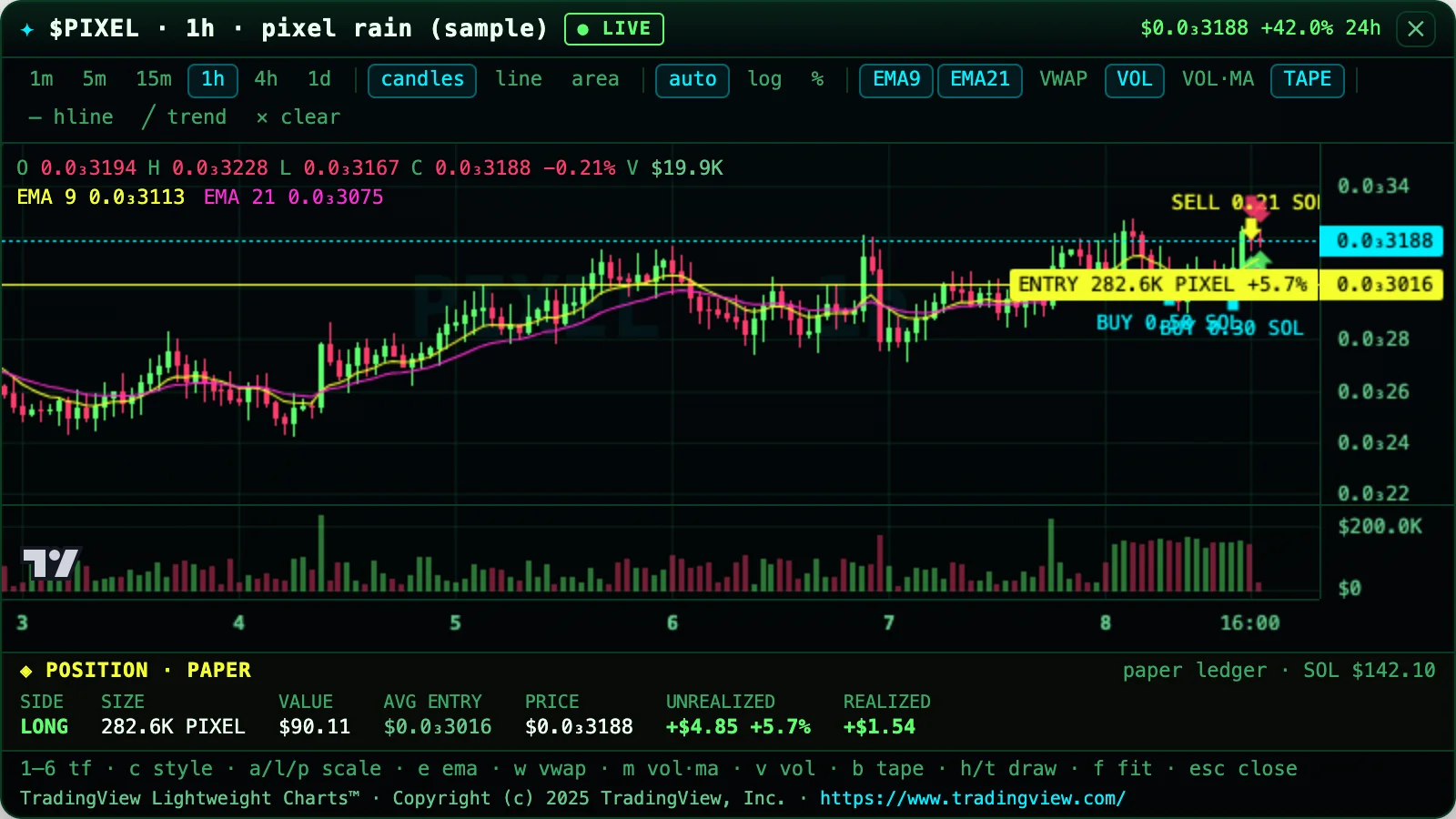
C on a token opens a chart window for that coin beside the terminal. The chart is TradingView's open-source Lightweight Charts™ (Apache-2.0), vendored into the app and served by a loopback-only server inside dexterm; the window is a 1.2 MB native shell (Rust, wry) when it is built, otherwise your default browser. Either way the page loads nothing from the network: candles, the trade tape, the live price and your paper position all come from the terminal's own caches over one local WebSocket.
Keys in the popup#
Click the window first: it opens unfocused so it never steals the terminal's keyboard. 1 · 2 · 3 · 4 · 5 · 6 → 1m · 5m · 15m · 1h · 4h · 1d. The popup's own timeframe; answered from the terminal's candle cache, no fetch.
| key | what |
|---|---|
| c | cycle candles → line → area. |
| a | auto price scale. |
| l | logarithmic price scale (again: back to auto). |
| p | percent scale (again: back to auto). `%` does the same. |
| % | percent scale. |
| e | EMA 9 and EMA 21 on/off. |
| w | VWAP on/off (anchored to the UTC day). |
| m | volume 20-period moving average on/off. |
| v | volume pane on/off. |
| b | buy/sell markers from the trade tape on/off. |
| h | draw a horizontal line (click to place). |
| t | draw a trend line (two clicks). |
| x | clear drawings. |
| Backspace | undo the last drawing. |
| f | fit all bars. |
| r | scroll to the latest bar. |
| q | close the popup. |
Global hotkeys (configurable in popup.json): Control+Alt+Super+Shift+KeyB shows or hides every popup, Control+Alt+Super+Shift+KeyW closes them all.
What it shows#
- candles, line or area; a volume pane; crosshair with the OHLCV, change and indicator values of the bar under it; wheel and pinch zoom, drag pan; auto, log or percent scale; local-time axis.
- the last-price line, and a dotted LIVE price line while the terminal's fast lane is streaming the coin; a
◌ STALE Nsbadge when no tick has arrived for 20 s. - buy and sell markers from the trade tape, EMA 9/21, VWAP (anchored to the UTC day), a volume 20-MA, horizontal and trend lines you draw (page memory only; they go when the popup closes).
- when you hold a PAPER position in the coin: an ENTRY line labelled with size and PnL %, BUY and SELL fill markers for the current position, STOP and TARGET lines when a ledger sets them, and the same position row the terminal shows under its chart.
- the six timeframes are the popup's own. 5m and 15m are derived from the cached 1m base, 4h and 1d from the cached 1h base, so switching costs no fetch; a base the terminal has not fetched yet shows an honest "warming … no extra requests" banner until it lands. 1s is not offered: the only trade source is a ≤60-trade tape refreshed at most every 20 s, so 1-second bars would be sparse and stale.
Market cap axis#
When the terminal is in market cap mode ($), the popup follows it within a tick: the Y axis, the last-value and position-line labels, the EMA / VWAP values and the header read market cap in K / M / B (300K, 1.2M), and the crosshair legend shows the market cap with the price in parentheses (C 1.2M ($0.0₃12)). The window title says mcap (current supply): every bar is scaled by today's supply (market cap ÷ price at the latest tick, as the terminal knows it), so older bars are not the exact market cap of their time. The bars themselves stay USD prices, so the entry, stop and target lines and the fill markers keep their meaning; only the labels change. When the coin has no known supply the popup keeps prices and the title says supply unknown · showing price. The position row reads AVG MC / MCAP; profit and loss stay in USD.
Bubble map popup#
M on the bubble map screen opens the same holder graph as real circles in a second HUD window (the chart can stay open). Hover a bubble for the rule behind its colour; click to select it, and the terminal selects the same holder; m flips to a treemap, z zooms the selected cluster, esc closes. The strip under the map carries the sample-captioned insights (top-10 raw and ex-pool, and the main-risk line when a counted owner holds more than 30 %) and a WHY THIS LABEL panel that leads with the selected holder's class (POOL, CURVE, VAULT, LOCK, CEX, BURN, DEV, LINKED or UNLABELLED) and its on-chain reason, then every rule, confidence and evidence line. The page receives a text-only view model over the local WebSocket (addresses, shares, rule text, numbers): no keys, no URLs, no fetches of its own; an unavailable or degraded scan shows a banner and never a fake map. Same server, ticket, CSP and event allow-list as the chart; the only event the page may send back is the validated address of a clicked holder.
Token and feeds popups#
I on the token screen opens the token-detail HUD: identity, price and changes, market cap, liquidity, holders, top-10 and dev share, authorities, the RugCheck score and risks, and the Snipers and Bundled cells from the wallet-intel scan. A cell that has not been measured shows its reason: needs Helius key only without a key, otherwise for example Helius paused · r or history failed · r. The window follows the terminal on every token or scan update.
M on the trending screen opens the feeds HUD: the posts behind the board, filtered and hidden exactly as the SOCIAL panel does it, plus the official news headlines, newest first. Instruction-like posts are withheld. Each row names its source. ↑/↓ select, and ⏎ asks the terminal to open that coin.
Both are read-only text views on the same server, ticket, CSP and event allow-list as the chart:
- The page gets text only. Post text is the stored firewalled text, drawn with
textContent. - The feeds page never holds a coin address. It sends back an index into the terminal's own list, and the terminal resolves the coin.
- Neither page can trade, sign or fetch.
I and M toggle the windows, and esc in a window closes it.
Docking (macOS)#
The window opens flush right of your terminal window with the same top and height; left of it when the right has no room; pinned at the screen edge (on top) when neither side fits; at the main screen's right edge when the terminal is not Terminal.app or iTerm2. It follows the terminal while open (one lightweight loop, about 0.3% CPU) until you drag the chart's title strip. It has no Dock icon. The terminal may ask once for Automation permission to read its own window bounds; if you deny, the chart opens at the screen edge instead of docked.
Security model#
- The server binds 127.0.0.1 only on a random port. LAN, Tailscale and
::1are refused; a strictHostcheck guards against DNS rebinding and a strictOrigincheck guards the WebSocket; no CORS header is ever sent. - Every popup opens with a single-use ticket (32 random bytes, 30 s). The page it buys embeds a one-time WebSocket token. The native shell receives the URL over stdin, never argv. The browser fallback necessarily passes the URL to
open, so it is briefly visible inpsto another local user; the worst case there is a failed window, never a key or a trade. - All script and style on the page is inlined under a CSP nonce; the vendored chart library is the one static file the server answers (exact path, from memory);
img-srcis none; the shell denies new-window requests and pins every navigation to the exact loopback origin (parsed, not string-prefixed). - Popups receive view models and theme tokens only: never keys, signer state or trade capability. Messages from the popup are checked against a closed set of UI event names and payload values (the six intervals, known indicator ids); anything else is dropped, reported to the terminal as
popup.dropped, and never echoed. - Untrusted strings (token name, symbol, address) are rendered with
textContentonly; a hostile token name never reaches the page HTML.
A ported attack suite (50 probes: traversal, wrong Host, other methods, WebSocket abuse, bad payloads) runs against the in-app server in the test suite.
Build the native window#
$ cd packages/popup && npm run build:shell     # cargo build --release, about a minute the first time
$ dexterm popup --self-test                     # which path is active, hotkey registration, measured fps
install.sh builds it when cargo is present (DEXTERM_SKIP_SHELL=1 skips); dexterm doctor has a "Chart window" line that says ready or prints the command. DEXTERM_POPUP_SHELL points at a prebuilt binary. Without the shell every feature works in the browser; the native window is an enhancement, never a requirement.
Config: ~/.dexterm/popup.json#
{
  "hotkey": "Control+Alt+Super+Shift+KeyB",
  "hotkeyClose": "Control+Alt+Super+Shift+KeyW",
  "dock": { "enabled": true, "width": 560, "follow": true, "followEvery": 0.5 },
  "rain": { "enabled": true, "speedScale": 1, "density": 0.55 },
  "fpsCap": 60
}
Everything is optional; a missing or malformed file falls back to these defaults and never stops a popup from opening. An empty hotkey string disables that chord. DEXTERM_HOME moves the directory.